 In terms of predictive accuracy, the High Precision Orbit Propagator (HPOP) in STK Premium Space has been thoroughly validated and is often used as a benchmark for testing the accuracy of other propagators. HPOP propagates an initial state by numerically integrating a wide and customizable force model that uses STK analysis to determine the most accurate representation of the forces experienced by the spacecraft on its path.
The default HPOP propagator is already one of the highest quality propagations in STK, but it is flexible to provide higher levels of fidelity as needed; drag as a function of atmospheric density, advanced atmospheric density models, solid and ocean tides, solar radiation pressure (SRP), central body radiation pressure and more can all be modeled and tailored to the needs of a mission.
You can change a satellite's propagator in STK by right clicking the satellite object and selecting properties. The satellite's propagator selection is shown at the top of the basic -> orbit page. The HPOP propagator can also be used in Astrogator and is the default propagator for the Astrogator module.
On default settings, HPOP will run reasonably quickly and provide enough accuracy for many purposes, but there are a few configuration options that can squeeze some additional fidelity from your propagator, which are addressed below.
Before going about this, it is important to understand the practical limit to the utility of propagation accuracy. For example, if the ephemeris coming out of an orbit determination for a real satellite has an uncertainty measured in hundreds of kilometers, then an advanced propagation mathematically accurate down to the centimeter would still inherit the kilometers of uncertainty of the orbit determination. In this case, computer-intensive propagation would provide little advantage over faster propagation methods.
It is also worth mentioning that real-world satellites will often receive an initial state vector from an orbit determination system such as ODTK. For the best accuracy, the user should specify the same propagator and force model for orbit prediction as was used in the orbit determination process.
Configuration Considerations for Maximizing HPOP Propagator Accuracy:
1. Atmospheric Density Model
2. HPOP Force Model
3. Attitude-Based Force Modeling
- N-Plate Model
- Area Tool Model
1. Atmospheric Density Model:
For low altitude orbits, atmospheric drag is the largest perturbation acting on a satellite, and accurately predicting this drag will have a significant effect on mission modeling accuracy. HPOP also enables custom atmospheric density plugins to be used with the “DensityModelPlugin” option on the Drag page of the Force Model Properties. By default, HPOP uses the Jacchia-Roberts atmospheric density model. Atmospheric density in this model fluctuates with time to represent seasonal changes in atmospheric density. However, the default model does not consider decade-long solar cycles, which cause cyclical shifts in the density of Earth’s upper atmosphere. If you would like to include solar cycles in your model, please contact our team by submitting a support ticket at https://lsas-tec.freshdesk.com/support/tickets/new, and our support team will be happy to assist you in this configuration.
2. HPOP Force Model:
The HPOP propagator has an array of configuration options to choose from that can be tailored to your specific mission. If you have estimated coefficient values, you can adjust the HPOP configuration to be more representative of the spacecraft you are flying. It is also possible to instruct STK to run higher-order approximations if it is necessary to your mission.
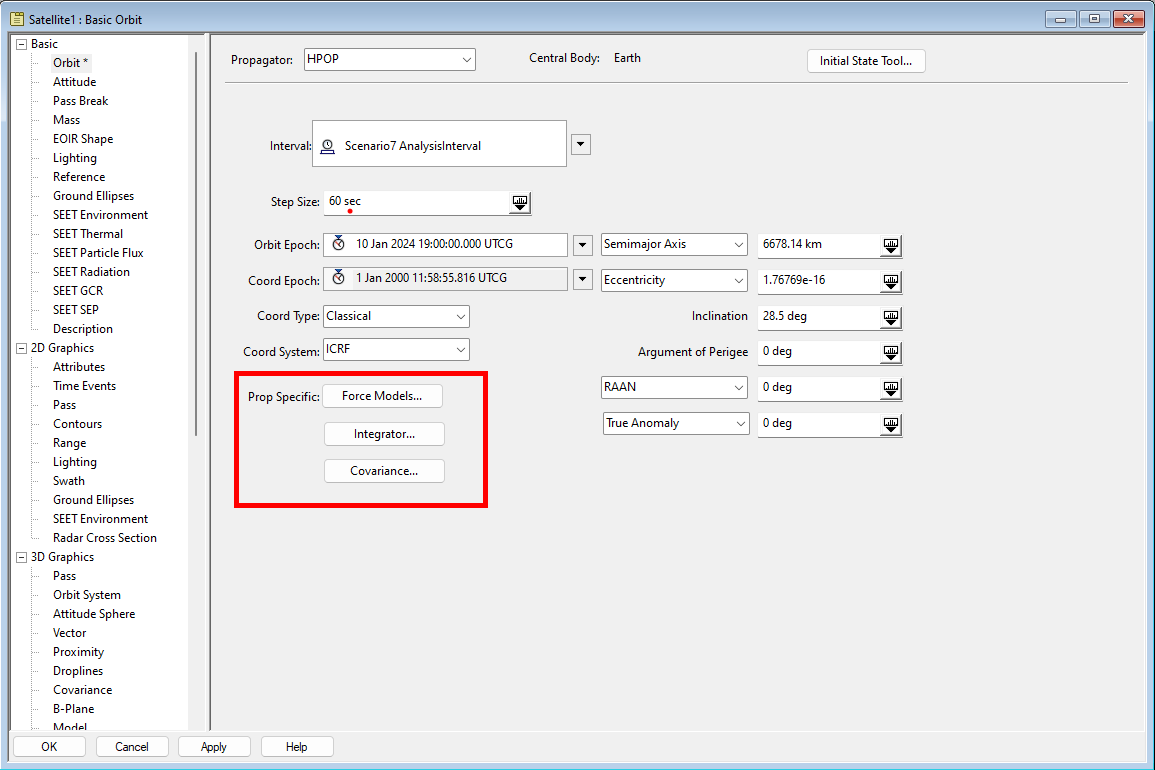
These presets can be adjusted on your satellite’s Properties -> Orbit page. The Force Models, Integrator, and Covariance can be configured and adjusted as needed from this page.
This article will briefly discuss the configuration options available within HPOP’s Force Models page. For more information about any of the specific pages, please refer to the hyperlinks for relevant STK Help documentation for these selections.
It is also important to consider which of these options would be the most useful for your particular mission. When modeling an interplanetary mission, you may want to consider the gravitational effects of additional planets, while for a LEO mission would find greater benefit from improving the Earth's gravity model. Additionally, you can improve performance by switching off unnecessary computations. For example, Earth's tidal modeling would not do much to improve the propagation of an interplanetary trajectory and could be switched off in this case to reduce run time.
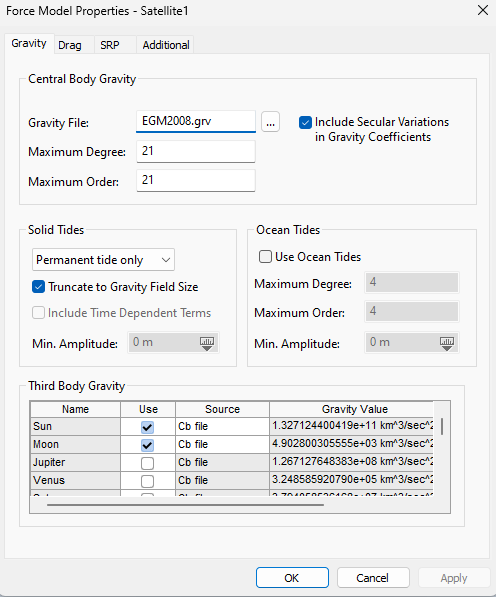
The Gravity page allows configuration of the gravity model. There are a few configurable areas, any of which have options for increasing fidelity. In the Central Body Gravity section, a user can increase the maximum degree and order of the central body gravity model. In the Solid Tides section, users can choose between the default “Permanent tide only,” which includes only the time-independent solid tides, or the “Full tide,” which includes additional time-variable solid tide effects. The Ocean tides section allows users to include ocean tides in the gravity model, which would be particularly helpful for modeling gravity for low altitude orbits. Additionally, for interplanetary missions, third body gravity effects can be considered in addition to the default, which considers only Sun and Moon third body effects.
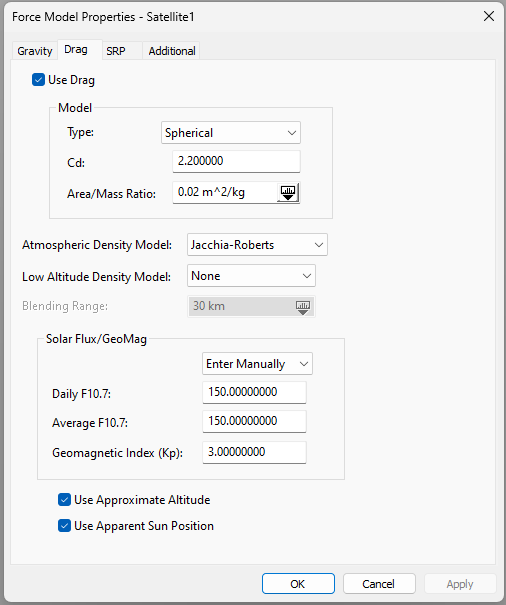
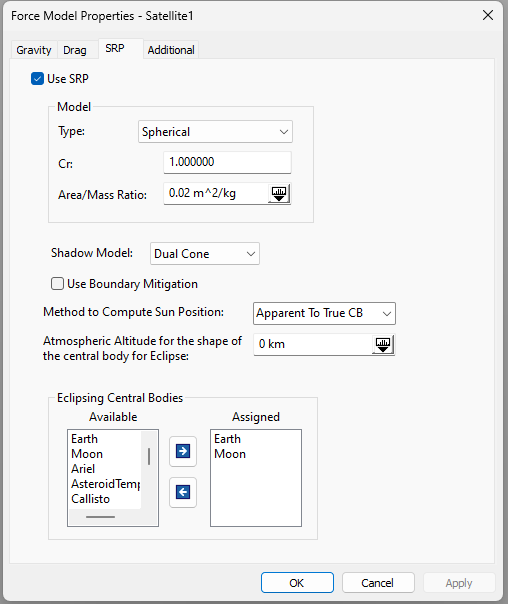
The Drag and SRP pages enable configuration of atmospheric drag and solar radiation pressure modeling. The Model section of both pages enables model-specific customization. The satellite model is assumed to be spherical; complex spacecraft geometry considerations will be discussed later in the Attitude-Based Force Models section of this article. For the spherical assumption, drag coefficient, reflectivity coefficient, and area to mass ratios can be configured to improve the fidelity of the simplified spherical model. If you have imported your spacecraft’s 3D model into STK, you can roughly estimate the area/mass ratio for the Drag and SRP models with STK’s Area Tool, available by right clicking your STK satellite object in the object browser and selecting the tool under the Satellite header.
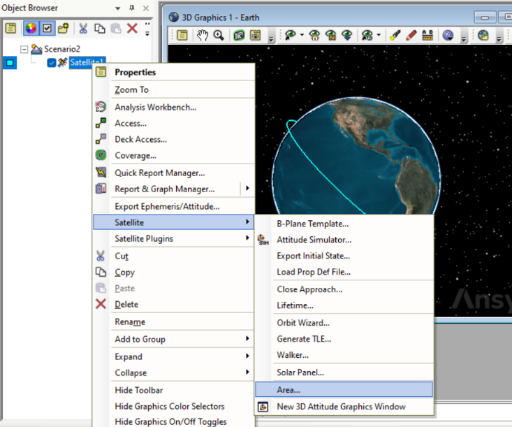
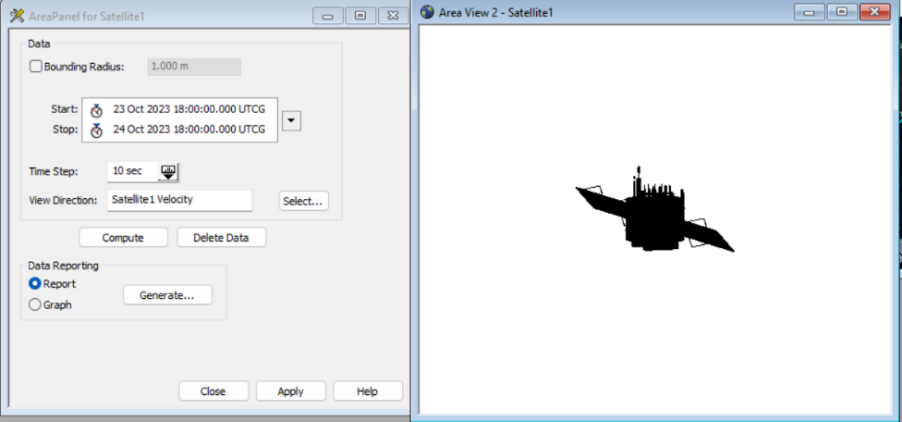
The Area Tool can run through a scenario interval, computing the 3D model's apparent area in the direction of a specified vector over the course of an analysis. The Area Tool can calculate the satellite area in the direction of motion (for drag) and in the direction of the sun (for SRP) at 60 second intervals over the course of an orbital period and output this data in a report. If you know your satellite’s mass, you can average the area values, divide by mass, and get a much more accurate Area/Mass ratio to put into HPOP’s Drag and SRP models.
As mentioned previously in this article, the atmospheric density model used in drag calculations can also be chosen on the drag page, as well as a custom low-altitude density model.
SRP modeling configuration can also be configured in-depth. The shadow model is by default the most complex Dual Cone option, and the sun position calculation automatically considers the speed of light in SRP calculations. If desired, the SRP can consider atmospheric effects on SRP, which is adjusted on the Atmospheric Altitude for the shape of the central body for Eclipse section. Please refer to the SRP parameters page for more details.
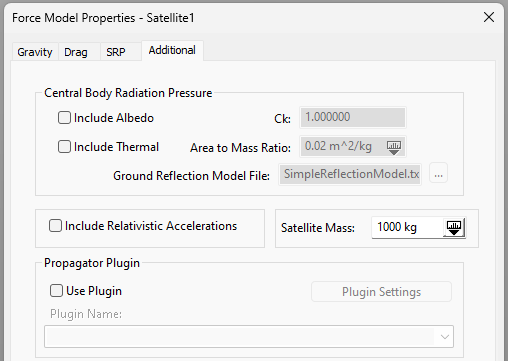
The Additional Models page enables a few more configuration options that can add fidelity to the HPOP propagator. Selecting Include Albedo will enable the force model to consider sunlight reflected off the Earth in SRP calculations. Selecting Include Thermal will incorporate black-box heat radiation from the central body in the force model.
3. Attitude-Based Force Modeling:
Earlier, we mentioned that HPOP assumes a spherical spacecraft geometry by default. However, when planning a particular satellite mission, HPOP can be tailored and configured to better represent the specifics of that mission. If you have the 3D model of the satellite you are propagating, and you are using STK’s SOLIS add-on module for attitude modeling during a mission or have an attitude profile for your satellite modeled in STK with plugins, it is possible for HPOP to consider the satellite’s 3D geometry and pointing in the force model of the satellite.
N-Plate Model:
The recommended method for considering 3D geometry in drag and SRP calculations is with the N-Plate model plugin created by AGI. This plugin sets up an idealized plate model of the spacecraft, approximated as a box of some size with plates of a chosen area and drag coefficient to model the solar panels. This model will now factor in the attitude of the satellite as it conducts its mission. This is not the most accurate method possible as it does not use the actual 3D model of the spacecraft, but it will provide a significant improvement in accuracy while still having a reasonable computing time. This model can be set up as a plugin with Astrogator and can be used in conjunction with SOLIS or other attitude models.
If you would like to configure the N-Plate model in your scenario, please contact our team by submitting a support ticket, and we will be happy to assist you with this setup.
Area Tool Model:
A slightly higher fidelity propagation can be achieved by automating HPOP’s area/mass ratio at each propagation interval with STK’s Area Tool, mentioned earlier. With plugins, it is possible to use the Area Tool to find the surface area of the satellite in the velocity and sun direction and adjust the surface area used for Drag and SRP calculations at each propagation step. This method can thus consider the complex geometry of STK’s 3D satellite model.
This method is generally not recommended, as it will require the Area Tool to be called at each propagation step, resulting in a very long computation time. For most high-fidelity propagation needs, the N-Plate model is sufficient. However, the Area Tool’s ability to consider a more complex 3D geometry than the N-Plate Model makes it slightly higher fidelity. If you want to configure this kind of propagation, please contact our team by submitting a support ticket and we will be happy to assist you with this setup.
This has been a cursory list of the configuration options available in HPOP for improving propagation fidelity. The recommendations in this article are not an exhaustive list, and there are countless customization options that can be used to model your specific mission with the highest degree of fidelity. For this reason, we invite you to contact our support team for assistance in getting the most out of STK by submitting a ticket at https://lsas-tec.freshdesk.com/support/tickets/new. We look forward to assisting you and ensuring a positive experience.
Thanks,
LSAS Tec-Support Team
Was this article helpful?
That’s Great!
Thank you for your feedback
Sorry! We couldn't be helpful
Thank you for your feedback
Feedback sent
We appreciate your effort and will try to fix the article