
Getting Started with Object Model and Connect
Link: STK Programming Help
What are the STK APIs?
STK’s main API is called STK Object Model. STK Components is another API, which is more customizable but also more complex to use and supports .Net and Java. In this article we will focus on the STK Object Model.
STK Object Model allows you to connect to an existing STK instance, or to start your own instance and use the different STK functionalities and automate them. Depending on the language you intend on using, the connection to STK COM libraries which contain various types, interfaces, events, and classes that represent the various aspects of the STK application structure differs.
Most of the important functionalities that STK has to offer are usable thanks to the STK Object Model API, but some of the latest objects updated in STK are only available through Connect commands, so be aware of that.
The Connect capability provides you with an easy way to connect with STK and work in a client-server environment.
The Connect commands are rather simple to use. They are strings of characters in a specific order that typically is ObjectType/ObjectName – Method – Parameters - Optional Parameters that STK understands and executes.
Connect commands can allow you to use every single feature STK has to offer, including in the latest update, until the Object Model API gets updated with the new methods.
Access to the STK Object Model API depending on your environment
Depending on the environment you are using, the process to connect to the STK Object Model COM libraries varies:
Microsoft Visual Studio .NET (C#, VB…)
Java Standalone Development/Runtime Environments
Java Eclipse Integrated Development Environment
Tutorials
A great way to get started with using STK APIs is starting with tutorials.
There are tutorials in all languages supported by STK:
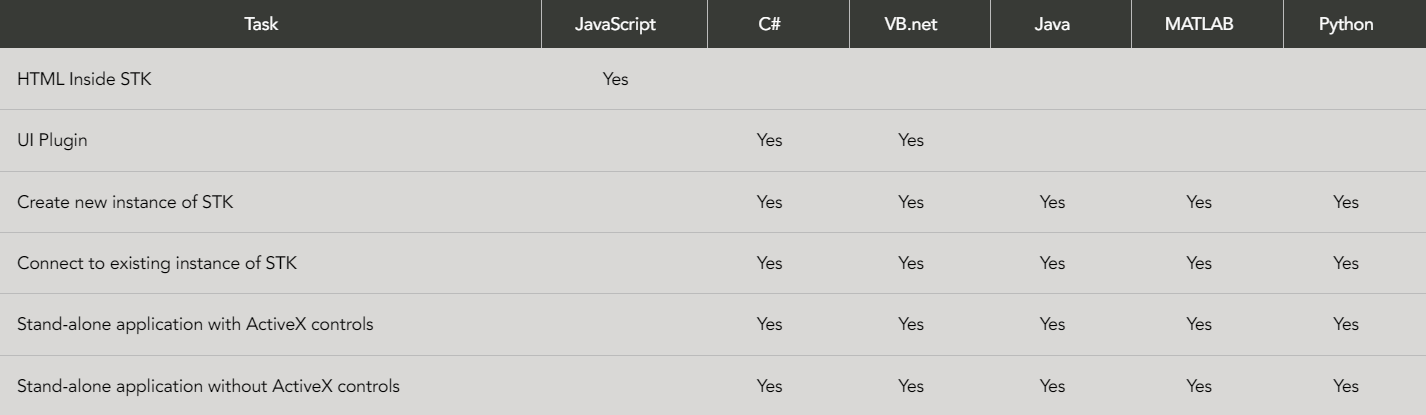
These tutorials focus on each of the important features of integration with STK.
We highly recommend starting with the STK Object Model Tutorial.
Code Samples
The code samples included in the STK install are read only. To work with any of the installed code samples:
- From the Windows Start menu, select STK 12->STK Codesamples 12 or to access <STK install folder>/CodeSamples/CodeSamples.zip.
- Copy CodeSamples.zip to a folder where you have write permissions and unzip the file.
- Change the properties of the files to writable before compiling them.
More information here.
Code Snippets
Visual Basic .NET Code Snippets
Library Reference
Whenever you want more information on specific class, method, interface, property, event, enumeration, or object, this page helps you find more detailed information about the type.
For Connect Commands, there is also a library here.
If you have any further questions or need assistance, we are here to help! Our dedicated Tec-Support team is ready to provide prompt and personalized assistance tailored to your needs. Please don't hesitate to reach out by submitting a ticket by going to https://lsas-tec.freshdesk.com/support/tickets/new. We look forward to assisting you and ensuring a positive experience.
Thanks,
LSAS Tec-Support Team
Was this article helpful?
That’s Great!
Thank you for your feedback
Sorry! We couldn't be helpful
Thank you for your feedback
Feedback sent
We appreciate your effort and will try to fix the article