
Does STK have Thermal Modelling and Integrate with Ansys Thermal Desktop?
STK does have thermal analysis capabilities through SEET and SOLIS. This is useful for the early stages of development, but as our customers get further along in their spacecraft design, they usually will rely on external tools for high-fidelity thermal modeling. The good news is that there is an integration between Ansys Thermal Desktop and STK!
About STK, the main two features that cover thermals are the following:
- STK SEET (Space Environment and Effects Tool for STK) Thermal Model:
- STK SEET Thermal and Vehicle Temperature Model calculates steady-state temperature of satellites, missiles, or launch vehicles due to solar and Earth radiation.
- Treats the vehicle as a single isothermal node, considering user-defined thermal characteristics.
- Temperature computations are based on models for spherical or planar objects with specific orientation.
- Main heat sources: direct solar energy, Earth-reflected sunlight (albedo), and Earth's infrared energy due to temperature.
- All sources active when vehicle is sunlit; only Earthshine infrared contributes in Earth's shadow.
- Internal heat-dissipation and thermal management system account for emitted, absorbed, and internal energy.
- STK SOLIS and ASI MAX Thermal Model:
- MAX and SOLIS utilize a thermal model to maintain thermal knowledge of the spacecraft.
- This considers temperature-based efficiencies for solar arrays and other aspects of the thermal environment.
- The thermal model uses a 2D finite element method consisting of one bus node and any number of external surfaces.
On the other hand, Thermal Desktop enables the following:
- Fast simulation at the system level using special modelling techniques.
- Computation of radiation heat exchange within the model and with the environment.
- Full integration of fluid flow and heat transfer.
Regarding the integration of Thermal Desktop in STK and with SEET, here are the solutions available to you:
- Integrated Thermal Analysis with Digital Mission Engineering (DME) environment for STK.
- Pass orbit parameters (via plugin) from STK to Thermal Desktop and choose which specific orbit times you want to make thermal analysis on.
- Thermal Desktop takes input data from STK and SEET to calculate radiation and thermal effects on vehicle.
This integration provides the following benefits:
- Thermal Desktop receives accurate input data (via plugin, just by using a button and few inputs).
- Ease of use in Thermal Desktop for users who don't have orbital mechanics background.
- Users can iterate on mission metrics and thermal design of spacecraft.
- Users can leverage reporting data from STK to understand peaks in temperature better than with only SEET.
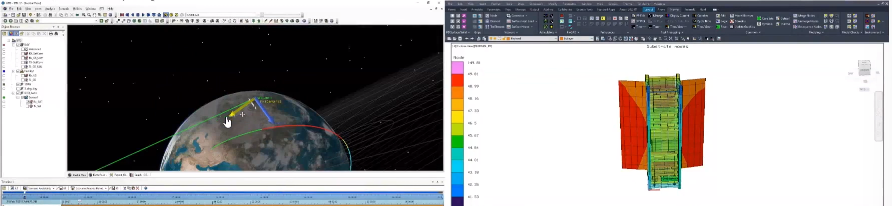
- You can directly visualize on your satellite 3D model the temperature variation over time on your different satellite parts, as shown in this screenshot:
What Mission Metrics are used?
- STK provides orbit datato Thermal Desktop:
- Design Reference Mission created in STK
- Orbit maneuvers satellite encounters created in STK
- High fidelity orbit data from STK to Thermal Desktop
- Thermal Desktop (TD) simulates full system thermal analysis
- TD is also able to communicate with other Ansys simulation software such as Ansys Mechanical Deformation which can also pass information to Ansys HFSS for example in the case where you would like to simulate antenna radiation pattern and field distribution when the antenna geometry gets deformed.
In summary:
- Thermal Desktop is easily integrated STK which can allow higher-accuracy desktop simulation thanks to orbit data and SEET inputs.
- If you want to accomplish high-fidelity thermal modeling, you will probably want to use Thermal Desktop tools in conjunction with STK.
- Thermal Desktop can achieve higher modeling accuracy with inputs provided by STK and its plugins such as orbit data and SEET data.
- Thermal Desktop can be further integrated with other Ansys simulation software such as Ansys Mechanical Deformation if that is something you are interested in.
If you would like to see a full demonstration of the use of Thermal Desktop in STK, I would highly recommend clicking this link where you can submit some information to get instant access to a webinar from Ansys regarding STK/TD integration.
Was this article helpful?
That’s Great!
Thank you for your feedback
Sorry! We couldn't be helpful
Thank you for your feedback
Feedback sent
We appreciate your effort and will try to fix the article